
Context Is Not Intent: The Living Blueprint as a System of Record for AI-Built Software
Context Is Not Intent: The Living Blueprint as a System of Record for AI-Built Software
How a living, approved blueprint complements AI coding agents, and why it is a different category from code search and auto-generated repository wikis
Draft for review, October 2026.
AI made code cheap. It did not make code right.
A developer can now ask Claude Code or Cursor for a discount feature on the order screen and have a working endpoint, a UI and tests in one session. The hard part has moved. The question is no longer “can we write this?” but “is this what we agreed to build, does it fit the rest of the system, and can we prove it is safe to ship?” Coding agents work from whatever is in their session. People each see their own slice of the system. Neither has a shared, approved record of what the system is supposed to be.
That record is what Think4Ever calls the Living Blueprint. This post explains what is in it, what each persona on a delivery team does with it, how it plugs into the coding agents teams already use, and why it is a different category from code intelligence tools such as Sourcegraph and DeepWiki, even though all three can answer questions about a codebase.
What the Living Blueprint is
Every Think4Ever project produces the same set of connected, reviewable artifacts, whether it starts from a sentence of business intent (Design from intent) or from an existing repository (Analyze existing code). There are thirteen artifacts in five families:
| Family | Artifacts | The question it settles |
|---|---|---|
| Intent | Requirements, Concept map, Functional architecture | What are we building, and for whom? |
| Behavior | Business flows, Business rules, Roles and permissions | How should it work, and what must always be true? |
| Structure | Data objects, Integration maps and APIs, Technical architecture and diagrams | What is it made of, and where does data go? |
| Experience | UI designs | What will people see? |
| Delivery and assurance | Requirements docs, Roadmap and build plan, Production readiness report | What do we ship, in what order, and is it ready? |
Three properties make it more than documentation:
- It is approved, not just generated. Requirements are produced by ThinkBrain from your objective and your answers, then reviewed, trimmed and approved by people. Business rules are stated in plain language and as a short expression, with a type, a severity and the behavior on violation. A rule such as “Username is the unique business key” carries the expression
!exists(user, user.username), links to the registration and profile flows, and specifies a 400 rejection when it is broken. That is something a business owner can sign and a tester can execute. - It is connected. Concept blocks link to screens, flows, data objects and rules. Change a block and you can see which flows, rules and objects it touches before anything is coded.
- It is live in both directions. Starting from code recovers the blueprint for systems that never had one. Starting from intent produces the blueprint before the code. Either way, a rescan after outside code changes brings the blueprint back in step, and requirements docs are regenerated from the current state with one Rebuild.
One blueprint, six personas
The same artifacts serve very different people. What differs is the first click.
Developers: “Stop re-explaining your product to every agent.”
The developer’s pain is the first twenty minutes of every agent session: re-describing the data model, the rules and the screens, then catching the agent when it invents a schema or breaks a caller. With the blueprint connected over MCP, the agent pulls the concept, the data objects, the rules and the planned UI instead of guessing them. On an inherited repository, the developer reads block summaries and business flows before reading code.
Opens first: Concept map and summaries, Data objects, Business rules, UI designs. Outcome: less re-prompting and rework, agents that stop inventing schemas, and faster onboarding, in the editor they already use.
Architects and tech leads: “Your architecture, enforced across every agent.”
When ten agents write code in parallel, architecture drifts one session at a time, and diagrams drawn once are stale by the next sprint. The blueprint makes the ERD, the API contracts, the integration map and the named rules the source of truth that every agent reads. Impact is checked in the blueprint before a change is approved, and production hardening runs before each release.
Opens first: Technical architecture, Data objects, Integration maps, Concept map. Outcome: architecture that is enforced rather than documented, and safer refactoring and modernization of legacy systems.
Product and business managers: “Approve the intent. Know it was built.”
Requirements drift between slides, tickets and code, and there is rarely a way to check that what shipped matches what was approved. Managers work in plain language: objectives, flows with success and failure paths, rules with severities, and a clickable UI preview. They approve the build plan phase by phase, and each rule is traced to the code it governs.
Opens first: Requirements, Business flows, Business rules, UI designs. Outcome: what ships matches what was approved, with fewer late surprises.
QA, security, risk and compliance: “Review the system, not just the diff.”
Reviewers are increasingly asked to sign off on AI-built code nobody documented. The blueprint gives them business flows whose failure paths are ready-made test outlines, rules whose violation behavior is the expected result, a roles-and-permissions matrix to test one role at a time, data flow and security diagrams, and a readiness report with findings ranked by severity.
Opens first: Business flows, Business rules, Roles and permissions, Readiness report. Outcome: evidence for review and audit, and visibility into code they did not write.
Business leaders: “Scale AI development without losing control.”
CIOs, CTOs and CFOs fund AI tools and outsourced delivery without a clear view of whether the output is coherent or safe, and with system knowledge locked in people, vendors and chat histories. The blueprint is one governed record across teams, vendors and agents. Leaders check the readiness score and grade on each release candidate, read the Concept Summary, and ask for roadmap phases before budget rather than after.
Opens first: Production readiness report, Requirements docs, Roadmap phases. Outcome: return on AI investment with control, and knowledge that stays with the company.
Consulting and delivery partners: “Understand, encode, build, govern.”
Partners repeat discovery on every engagement and lose context between advisory and delivery teams. With the blueprint they map a client’s existing system in the first week, agree scope on the blueprint rather than in slides, and hand over the blueprint and rebuilt specs with the code.
Opens first: Functional architecture, Requirements docs, Build plan. Outcome: a repeatable method sold as an outcome, with knowledge transferred to the client.
One change, every persona in the loop
The personas meet on a single change. A sales operations manager approves a rule: any order discounted by more than 15% needs a sales manager’s approval, and the approval is logged against the order. Weeks later a developer asks Claude Code to add bulk discounts for partner orders placed through the API; the agent reads the rule over Think MCP. Its proposal applies discounts of up to 25% automatically on the API path, so Think4Ever flags the conflict and shows its impact on the pricing API, the order screen, the approval notifications and the tests. The architect reviews the impact, corrects it and approves it. Leaders and security see the decision on record, and hardening re-runs before release. Nothing is re-explained, and nothing ships unapproved.
How the blueprint complements Claude Code and Cursor
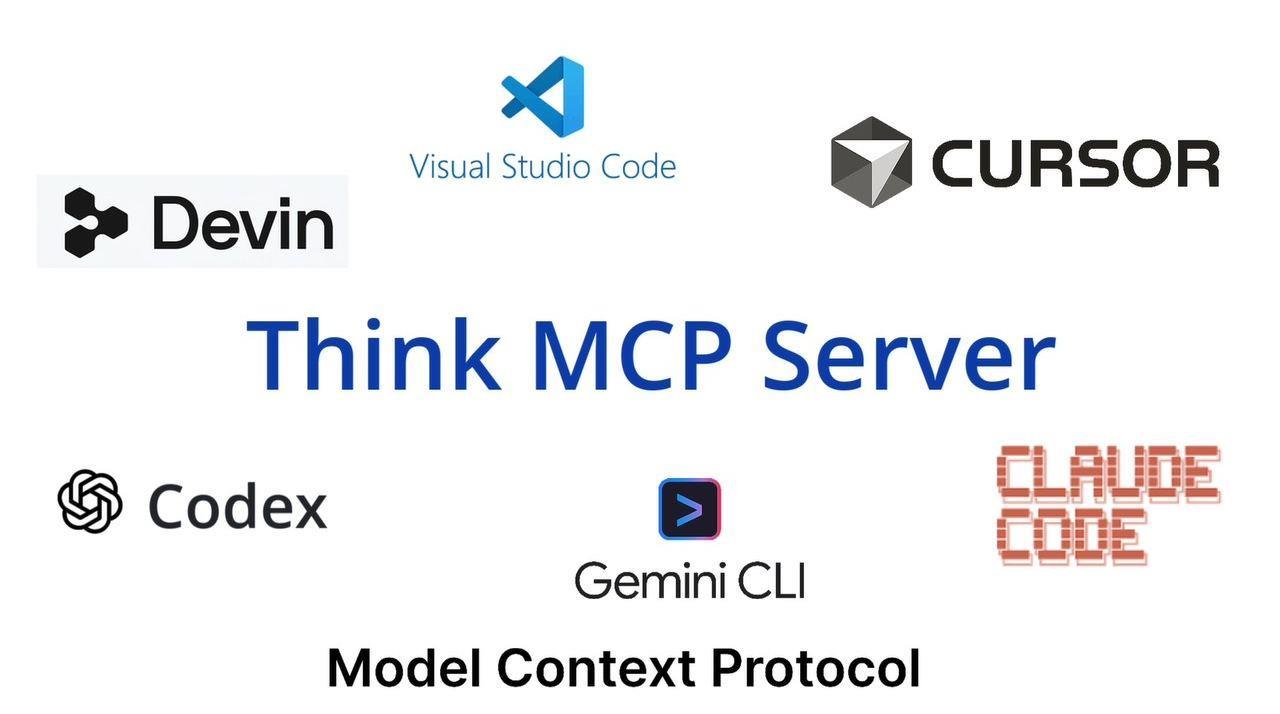
Think4Ever does not try to replace the coding agent. Claude Code answers “how do I write this code?” Think4Ever answers “what should this system be?” The two connect through the Model Context Protocol, the open standard that both Claude Code and Cursor use to connect to external tools and data sources [1, 2].
The mechanics. You connect your agent to a project once through MCP & Tools. Think MCP then serves the blueprint to any MCP client: Claude Code, Cursor, Codex, Windsurf and others. The agent reads concepts, flows, rules, data objects and screens as structured data. External agents run on your own subscription and do not consume Think4Ever credits.
What changes in practice. In one documented Claude Code session, the developer asked the agent to build the UI locally. The agent did not design anything: it pulled 21 finished screens as structured data, with page markup, a global stylesheet and a written design contract, and had a navigable app on localhost. Asked next for the server methods, it pulled a 23-entity ERD and the named business rules and coded against them, with no re-explaining.
Where each tool is strongest
| Concern | Claude Code / Cursor | Think4Ever Living Blueprint |
|---|---|---|
| Writing, refactoring and testing code | Primary | Supplies the spec to build against |
| Memory of the product | A fresh context each session, plus instruction files the developer writes: CLAUDE.md for Claude Code, .cursor/rules for Cursor [3, 4] | A persistent, reviewed model shared by every agent and person |
| Who can read and change it | Developers | Developers, architects, managers, QA, security, leaders, partners |
| Business rules and acceptance criteria | Whatever is in the prompt or the code | Named, approved rules with severity and violation behavior |
| Planning the work | Agent plans per task | A build plan by roadmap phase, each step naming pages, APIs, data, agent and target screen; nothing runs until confirmed |
| Release readiness | Tests the agent writes | 39 checks across 9 pillars, scored A to E, with Fix findings handed back to your agent over MCP |
The loop runs in both directions. Hardening findings go to Claude Code or Cursor through Fix findings. Code changed outside Think4Ever is rescanned so the blueprint stays current. Teams keep the editor, the agent and the model they prefer; the blueprint is what stays constant when those change.
A practical tip from the guide: build screen by screen against the planned UI. Teams that skip UI design let the coding tool invent the screens, and it shows.
How it differs from code search and repository wikis
Sourcegraph and DeepWiki are good products, and they answer real questions. It is worth being precise about which questions.
Sourcegraph is an enterprise code search and code intelligence platform. Its Enterprise plan covers “search and navigation across your entire codebase,” Deep Search (“an agentic code search tool that understands natural language questions about your codebase”), Batch Changes for “large-scale code changes across many repositories and code hosts,” and an MCP server that connects agents such as Claude Code, Codex and Cursor to the instance’s code search, with single-tenant cloud or self-hosted deployment, from $16K a year [5–8]. If the question is “where is this function called across 4,000 repositories?” or “change this API call everywhere,” Sourcegraph is built for it.
DeepWiki, from Cognition (the team behind Devin), launched in May 2025 to “turn any public GitHub repo into up-to-date documentation you can talk to, for free” [9]. According to Devin’s documentation, it “automatically generates architecture diagrams, documentation, and links to source code” [10]. Its MCP server gives agents three tools (read_wiki_structure, read_wiki_contents and ask_question) and is free for public repositories; private repositories go through a Devin account [11]. If the question is “help me understand this repository quickly,” DeepWiki is hard to beat.
Both are context engines. They read the code that exists and retrieve or summarize it. The Living Blueprint is a system of record for intent. The difference shows up in five places.
- Descriptive versus normative. A context engine tells you what the code does. The blueprint also says what the system is supposed to do, as approved by the people accountable for it. When the code auto-approves partner discounts up to 25% and the approved rule caps them at 15% without a manager’s sign-off, a context engine faithfully reports 25%. The blueprint flags the conflict.
- Derived versus owned. A wiki generated from code is regenerated from code; it cannot hold a decision the code does not yet reflect. Blueprint artifacts are reviewed, edited and approved by business owners, architects and security, and they persist when the code changes.
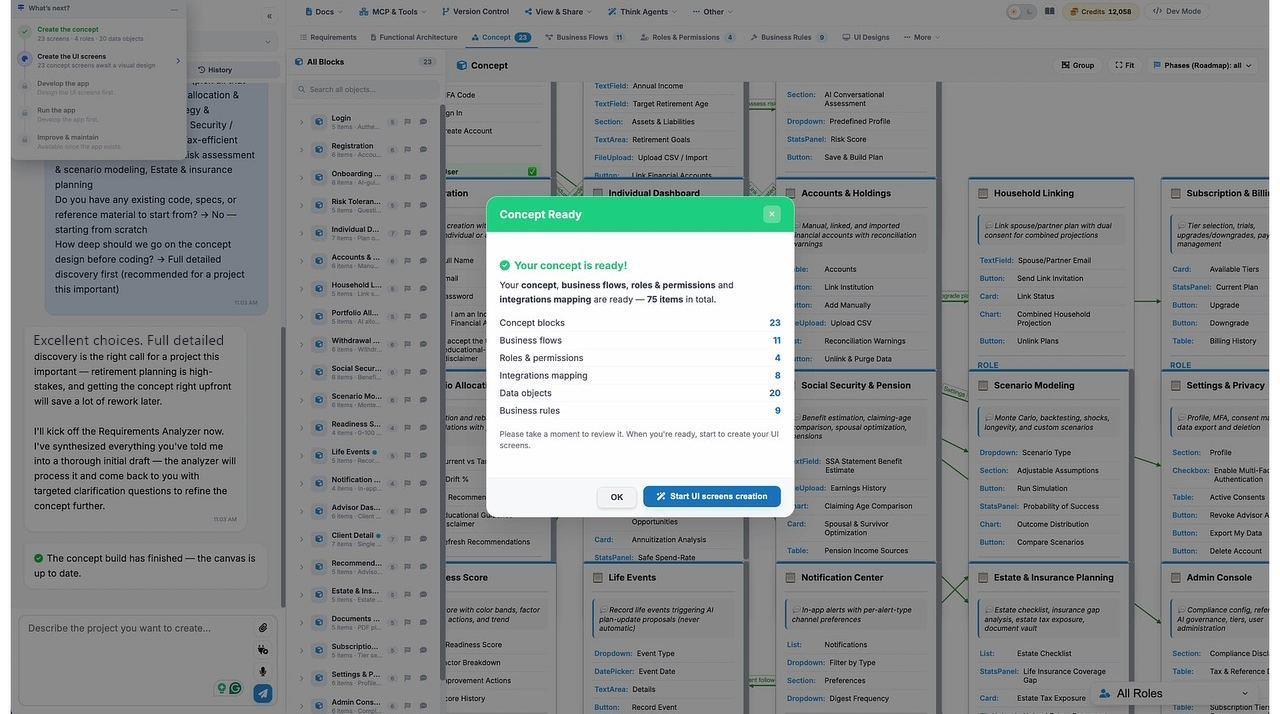
- Brownfield only versus both directions. Code intelligence needs code. The blueprint can start from a paragraph of intent, before a line exists (in the retirement-planner example: 23 concept blocks, 20 data objects, 11 business flows, 9 business rules, 8 integrations and 4 roles), or from an existing repository. Both land in the same model.
- Developer audience versus every role. Search results and code-linked wikis are written for engineers. The blueprint presents the same system as a flow for the analyst, rules for the business owner, a permissions matrix for security, an ERD for the engineer and a readiness grade for the leader.
- Answers versus governance. Context engines help you answer a question or make a change. The blueprint adds the steps around the change: impact shown before execution, a build plan approved before agents run, and a production readiness gate with exportable evidence before release.
Sourcegraph and DeepWiki columns summarize the vendor pages cited above [5–11], checked 19 October 2026. “No” means those pages describe no such capability.
| Dimension | Sourcegraph | DeepWiki | Think4Ever Living Blueprint |
|---|---|---|---|
| Starting point | Existing code, at enterprise scale | An existing repository | Business intent or existing code |
| Core output | Search results, code graph, large-scale edits | Generated wiki, diagrams, source-linked Q&A | 13 connected artifacts: requirements, flows, rules, roles, data, architecture, UI, plans, readiness |
| Source of truth | The code | The code | Approved intent, kept in sync with the code |
| Business rules | Found in code if you search for them | Explained if present in code | First-class, approved, with severity and violation behavior |
| Primary users | Developers, platform teams | Developers | Every delivery role |
| Serves agents over MCP | Yes | Yes | Yes |
| Approval and impact before change | No | No | Yes |
| Release readiness gate | No | No | 39 checks, 9 pillars, A to E grade |
Serving context to agents over MCP is now common, and the blueprint does not claim it as unique. What it adds is that the context the agent receives is the context the business approved.
These tools also fit together. An enterprise can use Sourcegraph to search a large code estate, DeepWiki to get oriented in an open-source dependency, and the Living Blueprint as the governed spec for the products it builds and changes. Search tells you what is there. The blueprint tells you what should be there, and checks the difference before it ships.
What it looks like across the lifecycle
The blueprint is not a design-phase deliverable that gets shelved. Most artifacts keep working through build, test and change.
| Moment | Without a living blueprint | With Think4Ever’s artifacts |
|---|---|---|
| Kick-off | Requirements in slides and tickets, interpreted differently by each team | Approved goals, roles, epics and stories that every later artifact is derived from |
| Design review | A diagram drawn once, stale by the next sprint | Concept, flows, data and screens generated together and kept connected |
| Agent session | The first part of every session spent re-describing the data model and rules | The agent pulls schema, rules and screens over MCP and builds against them |
| Testing | Test cases reverse-engineered from the code that was written | Test cases taken from approved flows and rule violation paths |
| Release | Go/no-go on confidence | Readiness score, grade and ranked findings, with fixes handed to agents |
| Change and onboarding | Read the code, ask whoever is left | Read summaries and flows, check impact in the blueprint, rescan to stay in step |
Two examples from the design artifacts guide make this concrete:
Recovering a blueprint from code. The public OpenAPI Petstore, a Spring Boot API with no design document, was imported from GitHub (26 files). Think4Ever recovered 10 screens, 10 business flows, 11 business rules, 6 data objects, 4 roles and 4 modules. Rules such as “Session token expires one hour after issue” came out in plain language, ready for a business owner to confirm or correct. The source repository was not changed.
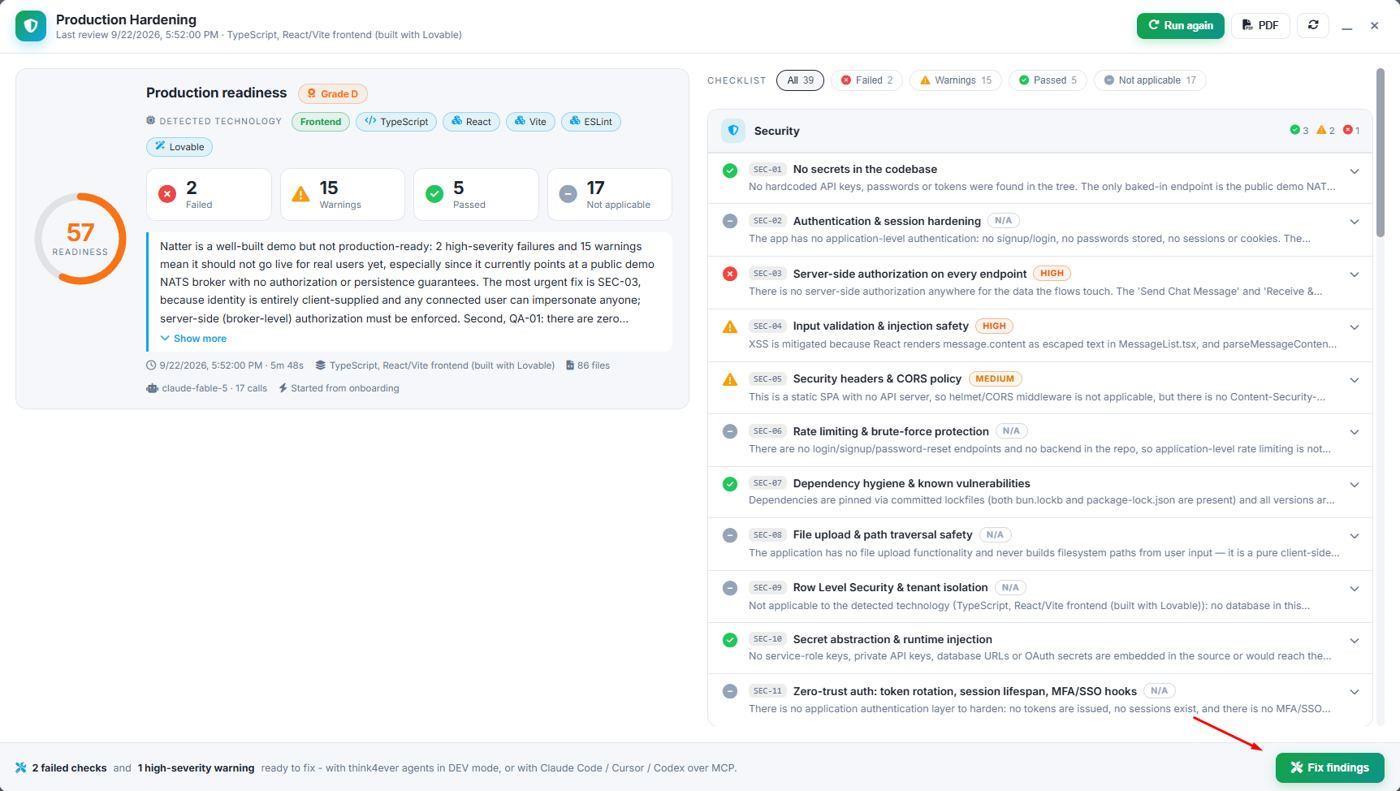
Gating a release on evidence. Natter, a React messaging app built with Lovable, looked finished. The readiness review read 86 files in under six minutes and scored it 57, Grade D. The top finding was missing server-side authorization: identity was client-supplied, so any user could impersonate anyone. The finding went to an agent through Fix findings rather than to production.
Getting started
- Pick your entry point. Start from intent for a new product, or point Analyze existing code at a repository and branch for an existing one.
- Review and approve. Walk the requirements, flows and rules with the people accountable for them. Read the rules aloud with the business owner; they are the decisions most often left implicit.
- Connect your agent. Add Think MCP to Claude Code, Cursor or Codex once, and ask the agent to pull the concept, schema and rules before writing code.
- Gate the release. Run Production Hardening, send failed checks back to your agent, and rebuild the requirements docs so the specs match what ships.
The full walkthrough, with screenshots for each phase and persona, is in the design artifacts guide.
AI agents write the code. The Living Blueprint keeps it coherent and governed.
Sources
Vendor pages were checked on 19 October 2026.
- Anthropic, “Connect Claude Code to tools via MCP” — https://code.claude.com/docs/en/mcp
- Cursor, “Model Context Protocol (MCP)” — https://cursor.com/docs/context/mcp
- Anthropic, “How Claude remembers your project (CLAUDE.md and auto memory)” — https://code.claude.com/docs/en/memory
- Cursor, “Rules” — https://cursor.com/docs/context/rules
- Sourcegraph, “Pricing (Enterprise plan)” — https://sourcegraph.com/pricing
- Sourcegraph, “Deep Search” — https://sourcegraph.com/docs/deep-search
- Sourcegraph, “Batch Changes” — https://sourcegraph.com/docs/batch-changes
- Sourcegraph, “Sourcegraph MCP Server” — https://sourcegraph.com/docs/api/mcp
- Cognition, “DeepWiki (announcement, May 2025)” — https://cognition.com/blog/deepwiki
- Devin Docs, “DeepWiki” — https://docs.devin.ai/work-with-devin/deepwiki
- Devin Docs, “DeepWiki MCP” — https://docs.devin.ai/work-with-devin/deepwiki-mcp
- Think4Ever, “Putting the blueprint to work (design artifacts guide)” — https://think4ever.com/tutorials/design-artifacts-guide/