
How to: Make Vibe-Coded Applications Production Ready
Already know why? Skip to the step-by-step instructions →
Why vibe-coded apps aren't ready for enterprise
AI app builders such as Lovable and Emergent can turn an idea into a working app in hours. That speed comes from building the happy path: the flow where every user behaves, every service answers and traffic stays low. Enterprise applications have to survive misuse, failed dependencies and traffic spikes, and stay maintainable by the engineers who inherit them.
To get a demo working fast, vibe-coded apps often take shortcuts that don't belong in an enterprise system:
- The front end talks straight to the database. The browser reads and writes data directly, protected only by database row-level rules. There's no server layer to enforce business logic, check permissions or validate input.
- Trust lives in the browser. Identity, roles or prices are supplied by the client, so a user can change them.
- Secrets and settings are hardcoded. API keys sit in the code, and configuration isn't separated by environment.
- Failures are unhandled. No retries, fallbacks or friendly errors, and stack traces leak to users.
- Nobody can see what's happening. No structured logs, error tracking or metrics.
- It's built for one user. In-memory state breaks when the app runs on more than one server, and lists aren't paginated.
- There's no path to production. No versioned database migrations, CI pipeline, backups, tests or runbook.
The builders' own pre-publish scans help, but they check one platform's security settings. They don't cover the wider enterprise requirements: configuration, reliability, data, observability, performance, deployment, testing and privacy.
Think4Ever Production Hardening closes that gap. It audits any codebase, whether from Lovable, Emergent, a coding agent or a traditional team, against a production-readiness checklist. You get a score, cited evidence for every finding, and fixes you approve before anything changes.
Further reading: From prototype to production and the Production Hardening documentation.
What Production Hardening checks
The review covers nine pillars. Each has its own reviewer agent and a set of checks.
| Pillar | Checks | Typical gaps in vibe-coded apps |
|---|---|---|
| Security | 11 | Permissive row-level security, no server-side authorization, weak sessions, exposed secrets, no rate limiting or security headers |
| Data & Database | 5 | No versioned migrations, unbounded connections, missing constraints and indexes, no backups |
| Observability | 5 | No structured logging, correlation IDs, error tracking or metrics |
| Reliability & Error Handling | 4 | Unhandled exceptions, leaked stack traces, no fallback when a dependency fails |
| Performance & Scalability | 4 | In-memory state that breaks across instances, unpaginated lists, N+1 queries, slow work in the request |
| Build, Deploy & Operations | 4 | Unpinned runtimes, no CI pipeline, containers running as root with baked-in secrets, no runbook |
| Configuration & Environment | 3 | Hardcoded parameters, unvalidated environment variables, configuration drift |
| Testing & Quality | 3 | Little or no automated test coverage |
| Privacy & Compliance | 2 | Personal data not minimized or encrypted, no deletion path, no audit trail for sensitive actions |
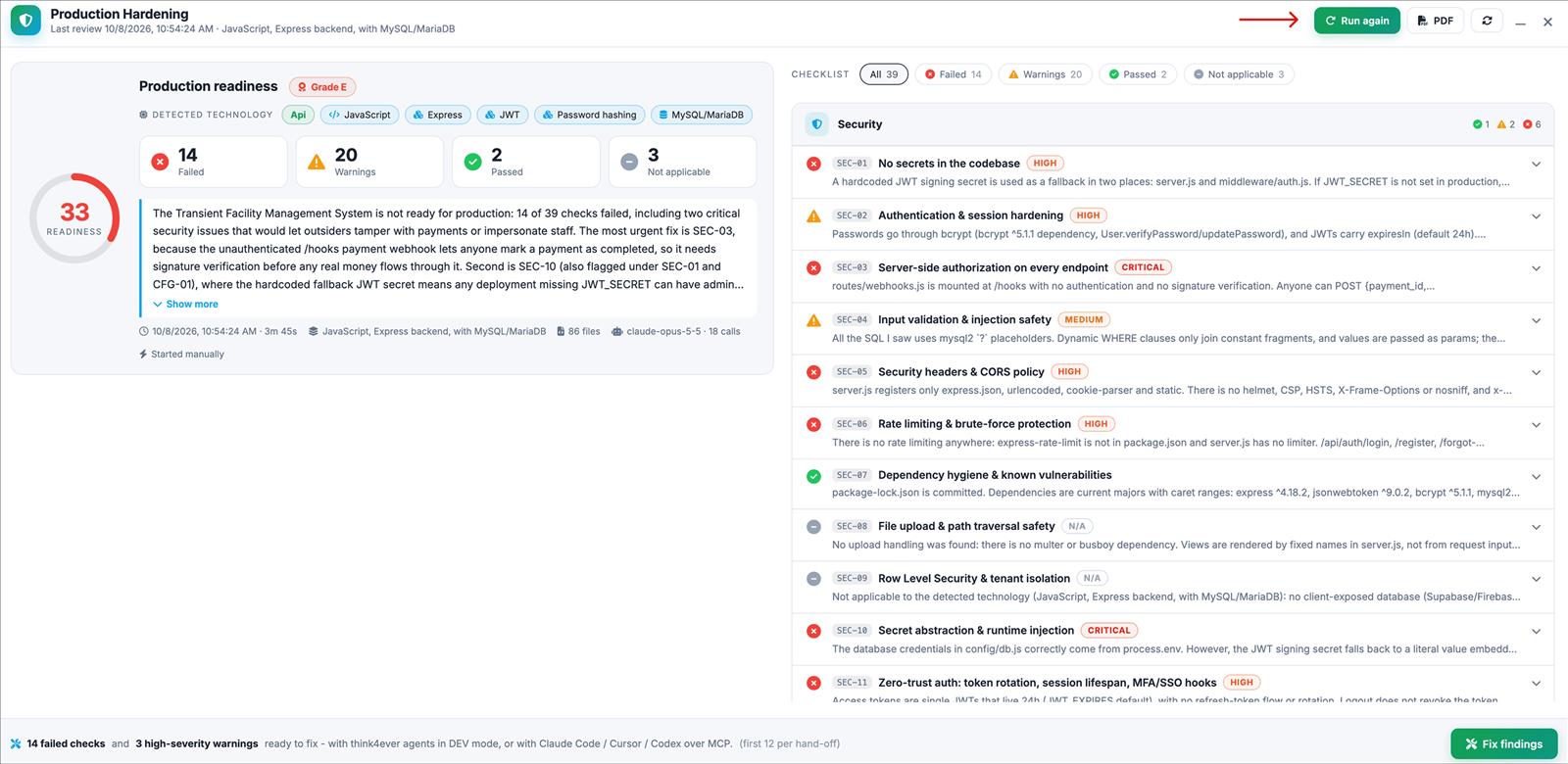
Each pillar has its own checklist with an ID, what the check requires and a default severity. The Security pillar is the largest:
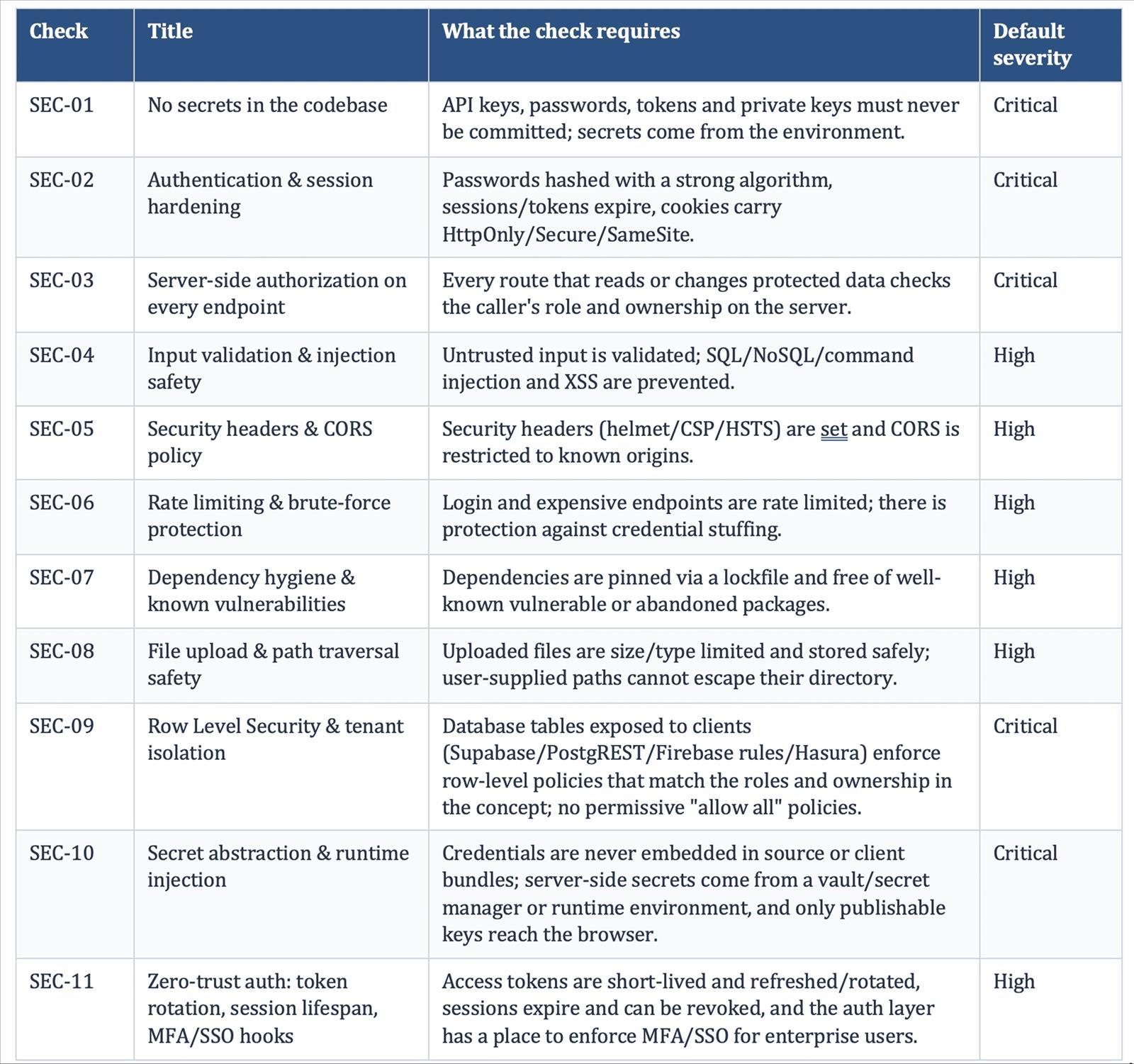
The checklists for all nine pillars are on the Full checklist tab.
Each check gets one of four results, with its reasoning and the files and line ranges it's based on:
- Passed: the check is met.
- Warning: a partial gap, with a severity.
- Failed: a clear gap, with a severity.
- Not applicable: the check doesn't apply to your stack, for example row-level security when there's no client-exposed database.
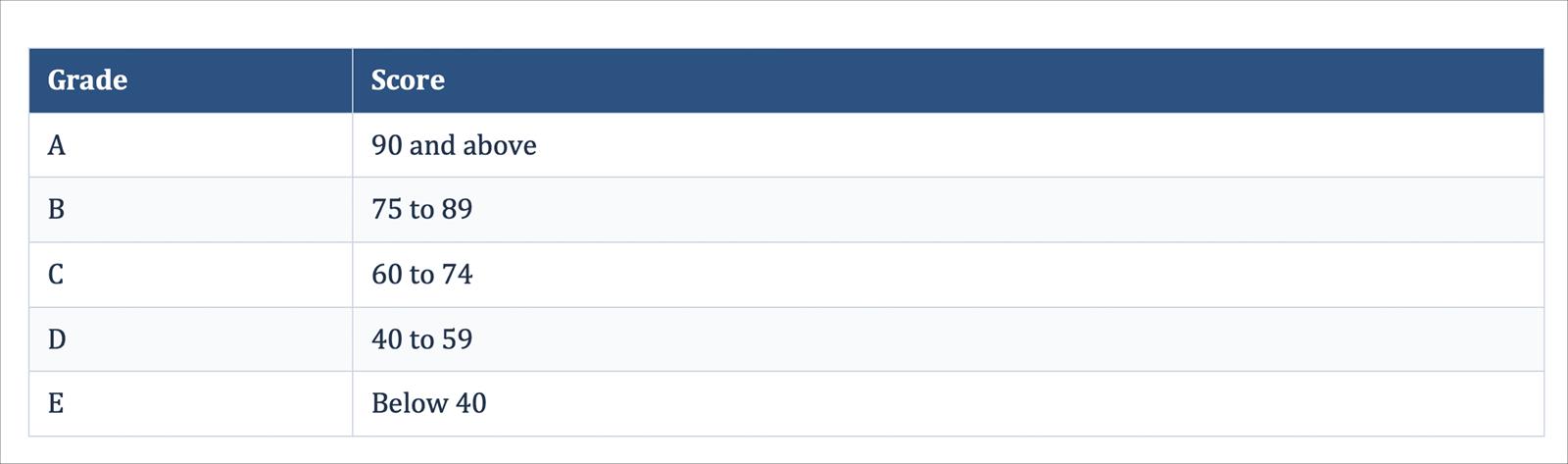
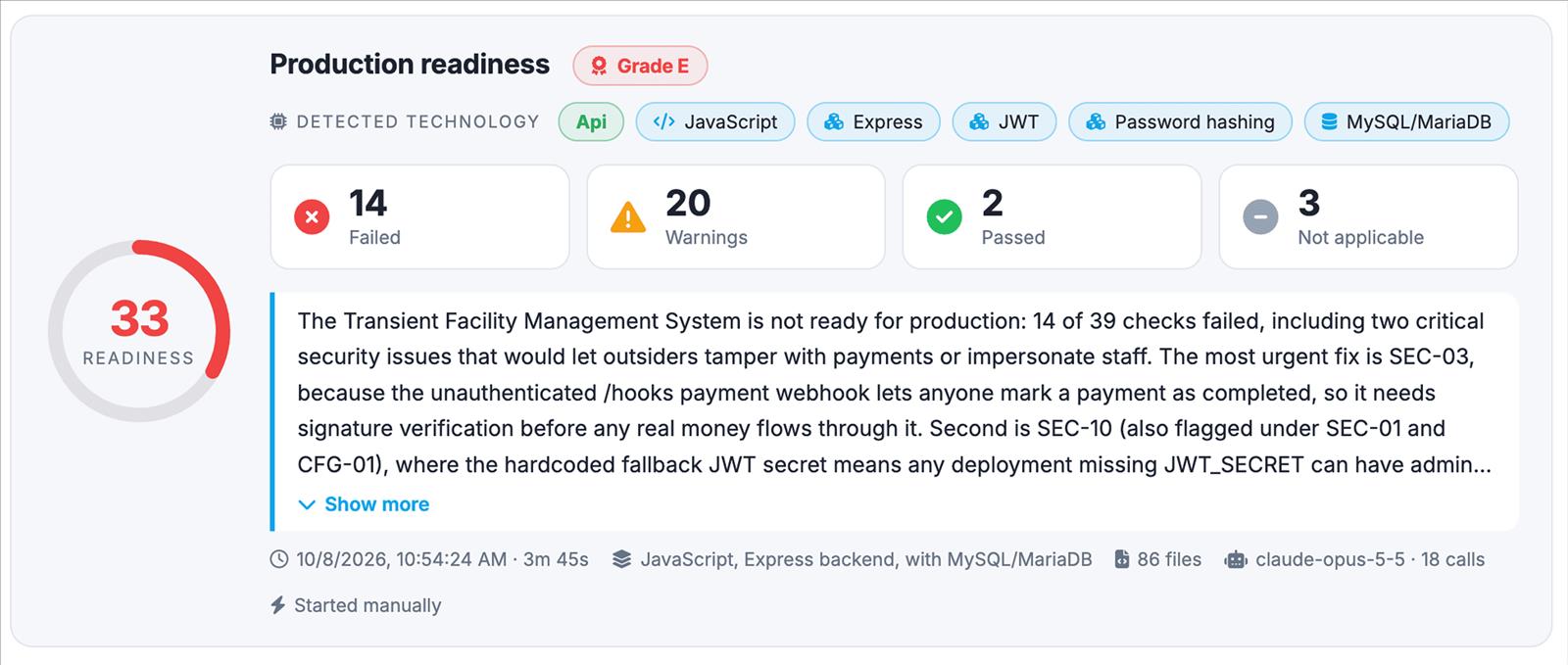
The Production Readiness Score is the share of applicable checks that pass, with warnings counting as half, graded A to E:
Severity doesn't change the score. It sets the order in which to fix things.
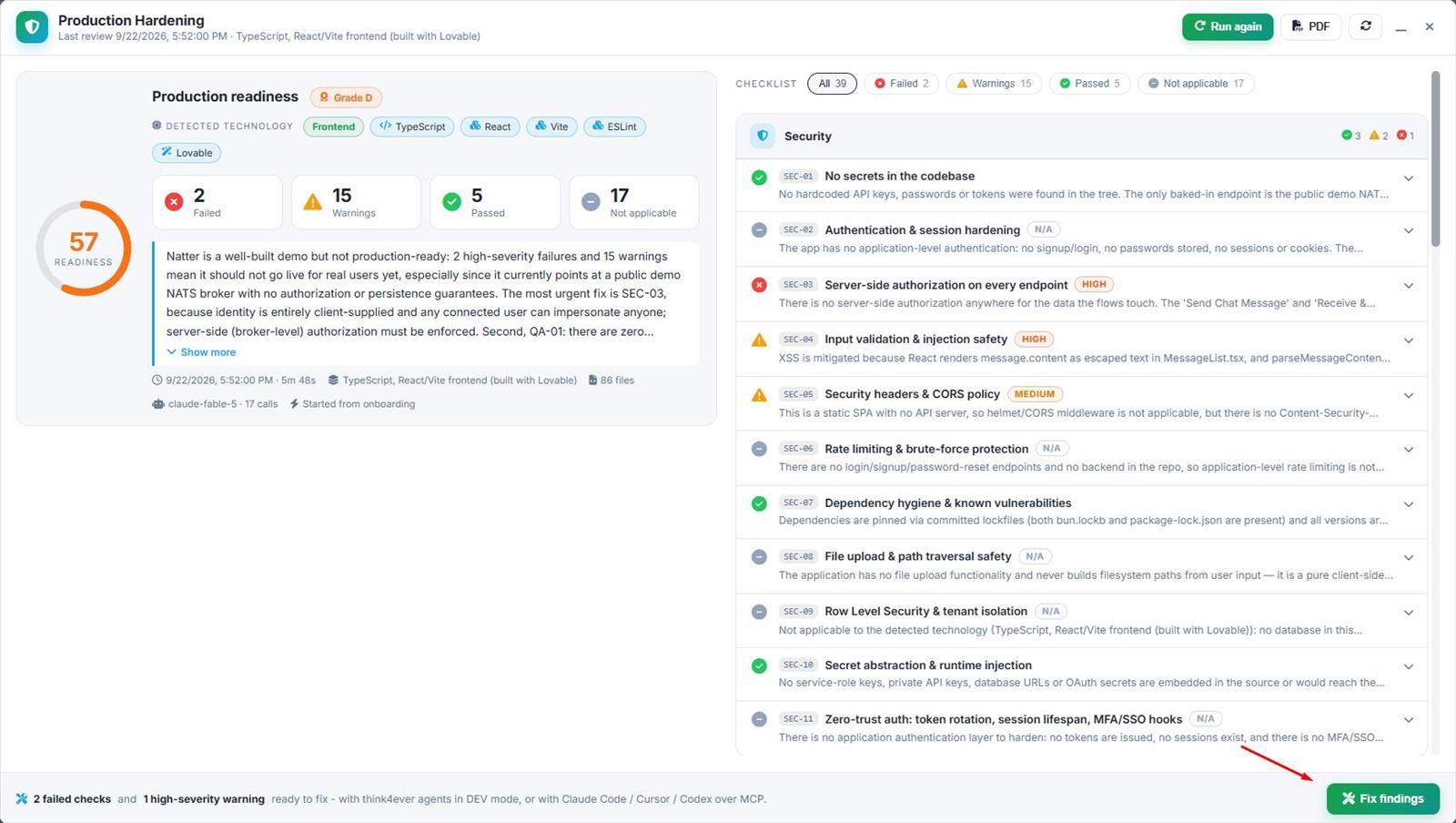
Example from the blog: a Lovable-built React messaging app, Natter (86 files), was reviewed in under six minutes and scored 57, grade D. The most urgent finding was that user identity was supplied entirely by the browser, so any user could impersonate another. Because the app had no database, a scan focused on row-level security would have found nothing.
Step by step
Step 1: Start a hardening project
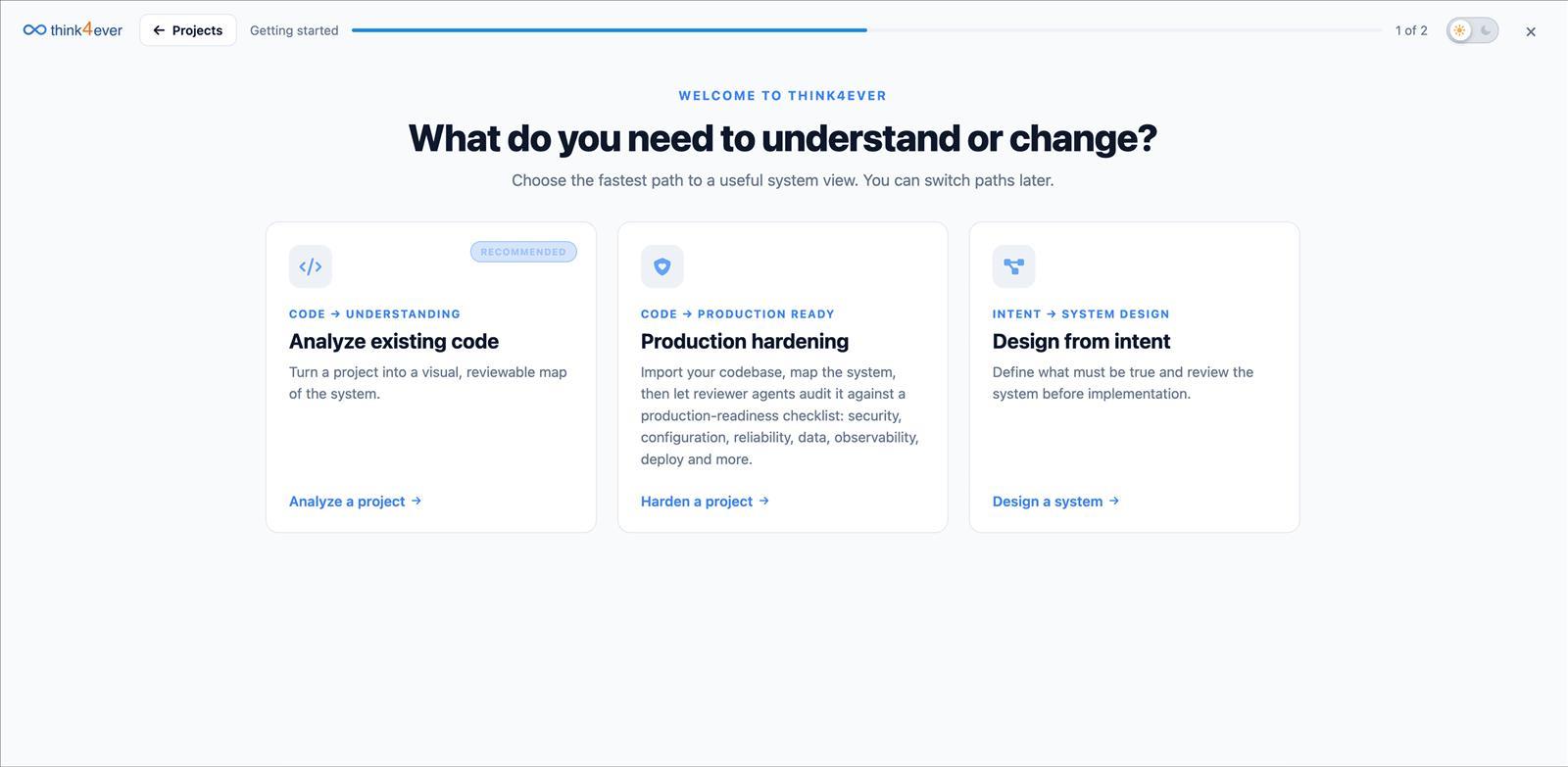
- On the Think4Ever onboarding screen ("What do you need to understand or change?"), choose Production hardening → Harden a project.
-
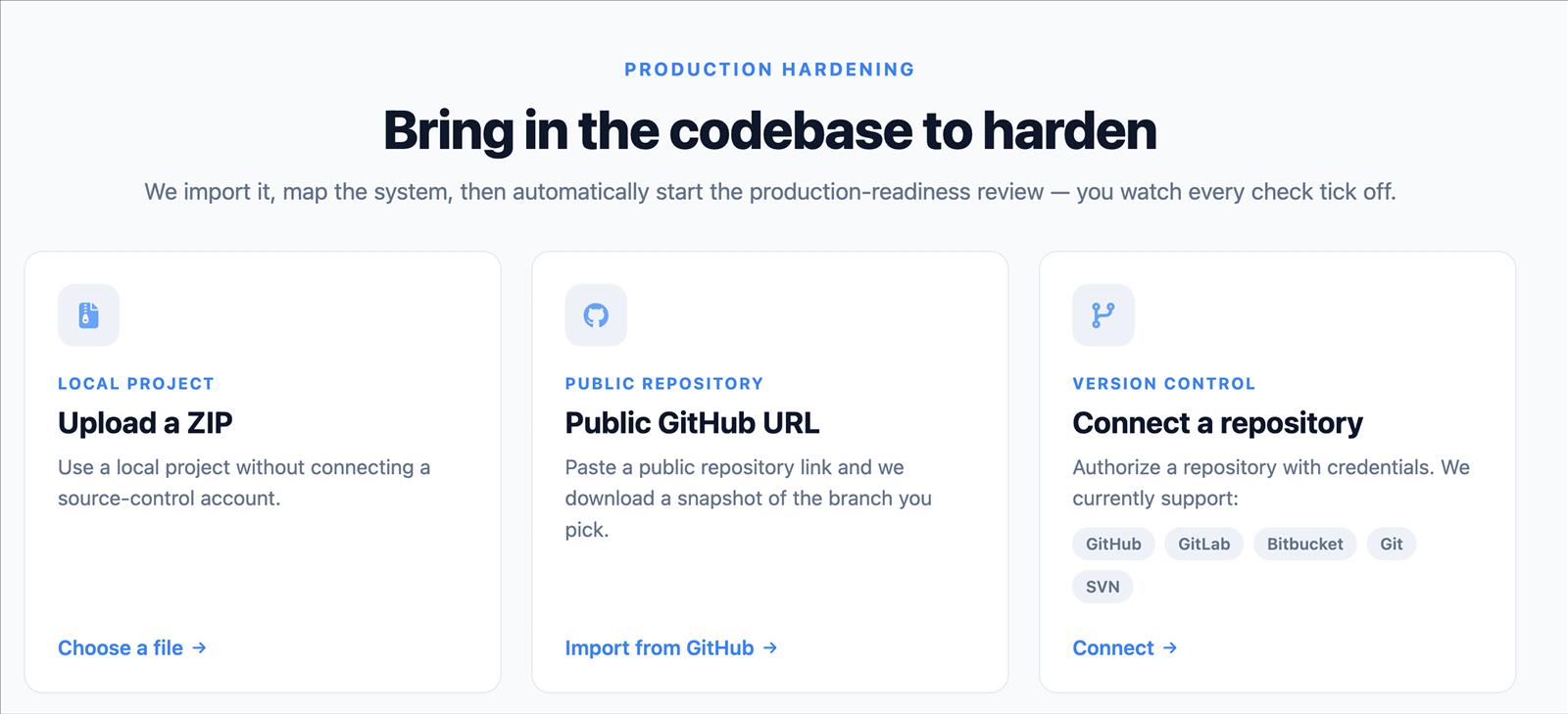
Bring in the codebase in one of three ways:
- Upload a ZIP: use a local project without connecting a source-control account
- Public GitHub URL: paste a public repository link and pick the branch
- Connect a repository: authorize a GitHub, GitLab, Bitbucket, Git or SVN repository with credentials
For a Lovable or Emergent app, connect the GitHub repository it syncs to, or export the code as a ZIP.
Step 2: Let Think4Ever map the system
Think4Ever detects the tech stack and builds the project's concept: business flows (with the role, screen and data for each step), roles and permissions, and data objects. The checks are graded against this map, so the review understands what the app is meant to do, not just how the code looks. The review waits until the map is finished.
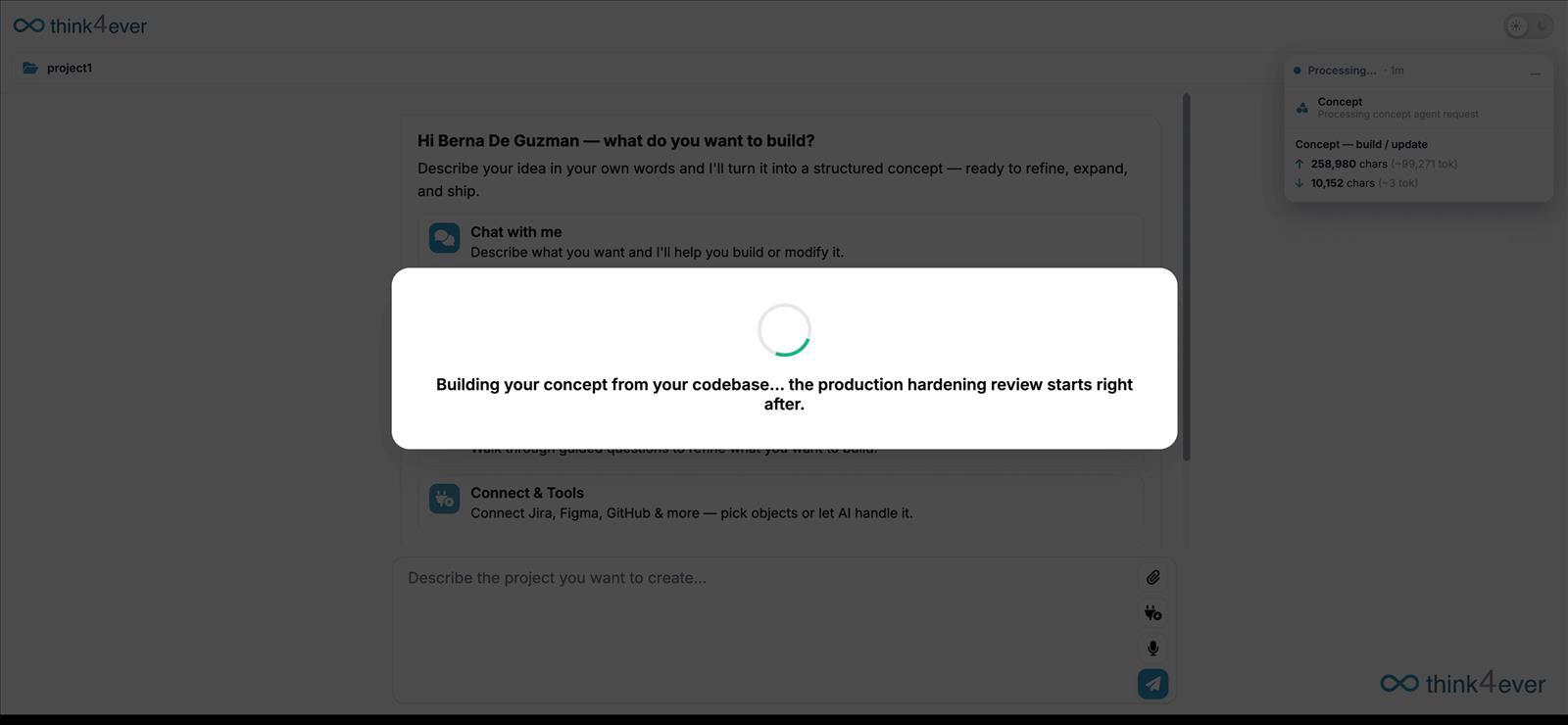
Step 3: Run the review
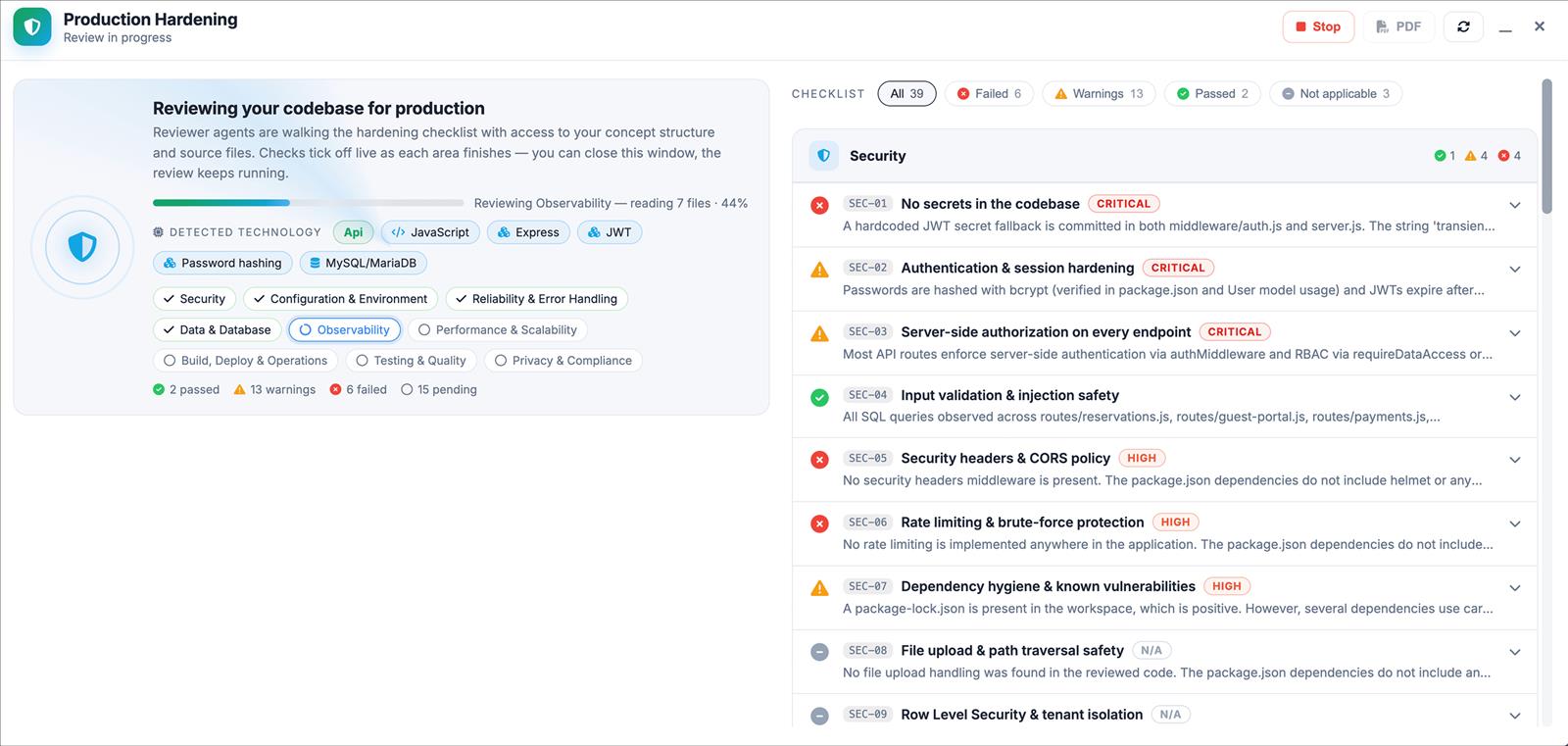
One reviewer agent per pillar works through its checks. Each agent reads the concept summary, the file tree and key files such as dependency manifests, the Dockerfile, CI configuration, the README and entry points, and can ask for more source files. Progress updates live, and you can close the window while it runs.
The review is a static reading of the source code. It doesn't build, run or test your app. Values in .env files are hidden from the reviewers, which see only the variable names.
Step 4: Read the report
The report header shows the score and grade, the number of checks in each status, a plain-language summary of the most urgent issues, the detected stack, the number of files scanned and the model used. Use Report Filters to show failed, warning, passed or not-applicable checks. Every result cites the files and lines it's based on.
Use PDF to export the report for your team or auditors. Past runs stay in the review history.
Step 5: Fix the findings
Click Fix findings to fix every failed check plus critical and high-severity warnings, up to 12 at a time, or Fix this check for a single finding. Then choose who does the work:
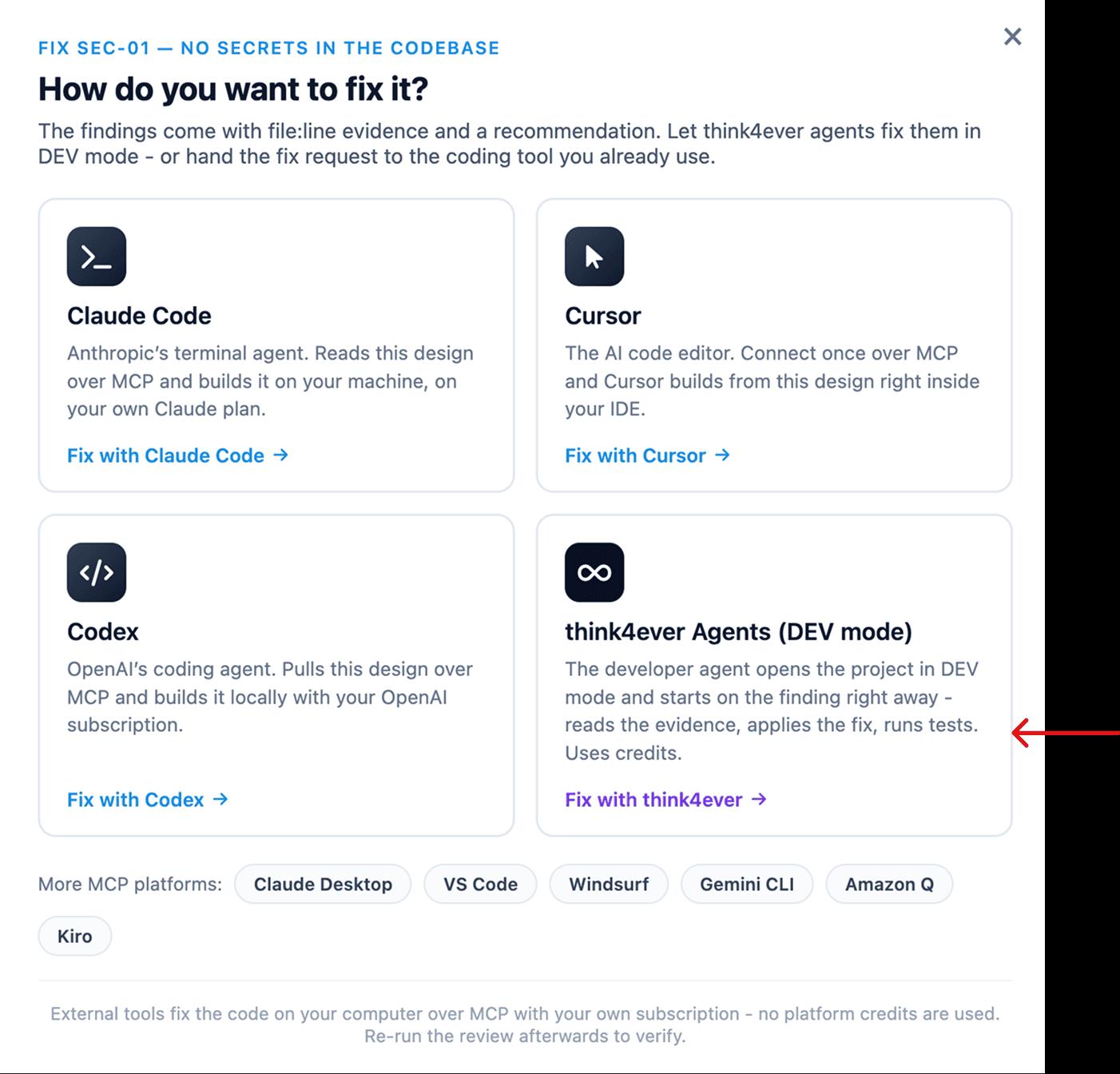
| Think4Ever developer agent | Your own coding agent | |
|---|---|---|
| How | Runs in DEV mode inside Think4Ever | Copy the fix request into Claude Code, Cursor or Codex |
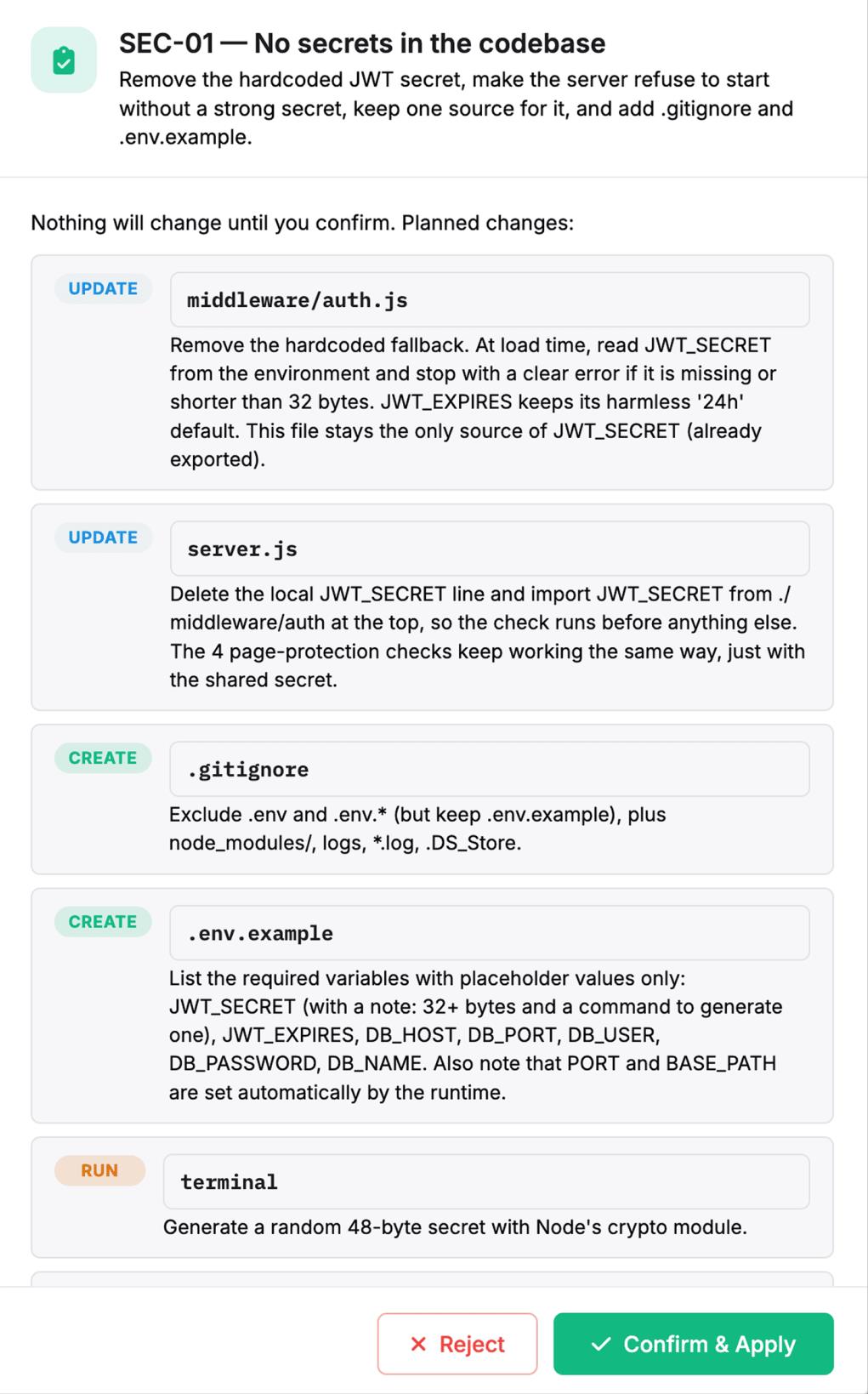
| Control | Shows a plan listing every file it will create, change or delete and which checks each change fixes. Nothing changes until you click Confirm & Apply | Your tool edits your local copy under its own approval rules |
| Cost | Uses Think4Ever credits | Uses your own subscription, no Think4Ever credits |
| Saving the result | Writes to the workspace files. Commit and push from Version Control | Re-import the fixed code into Think4Ever before re-running the review |
The fix request for external tools includes the findings, evidence, recommendations and the Think MCP calls that fetch the full results and grading rules.
Step 6: Re-run before every release
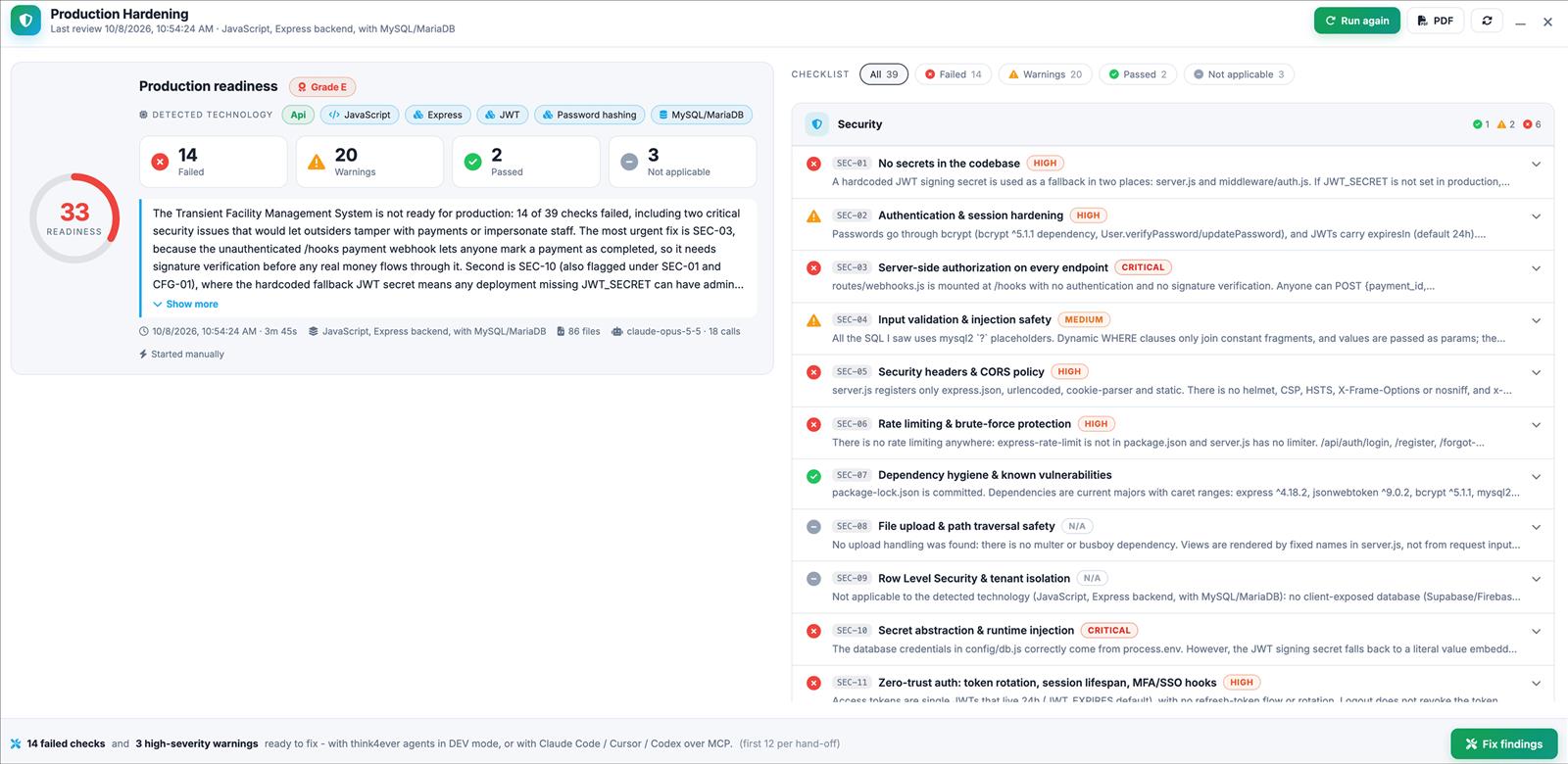
Click Run again after each round of fixes and before each release. The new run checks your fixes and catches regressions, such as a secret that crept back in or an authorization check that was removed. You can also start runs from the REST API (POST /v1/projects/{id}/hardening/run) or over MCP, for example from a CI pipeline.
Recommended path to production
- Run your builder's own security scan, for example Lovable's pre-publish checks.
- Harden the app with Think4Ever across all nine pillars.
- Re-run the Think4Ever review before every release.
- Run a penetration test before major releases.
FAQ
Does this replace my builder's built-in scan?
No. Keep using it. Production Hardening covers all nine pillars, not just security, and works on code from any source.
Is the report a SOC 2 certification?
No. It's evidence of what was checked and found, which helps with SOC 2 and GDPR reviews, but it isn't an independent auditor's attestation.
Does it replace a penetration test?
No. It reads the source code without running the app. Run a penetration test before major releases.
What happens to my code?
The review reads only the copy imported into your Think4Ever workspace. It never connects to your computer or your original repository. Reviewers see a summary, the file tree and a limited set of files, with .env values hidden. Files over 400 KB are never read.
Do I have to fix everything inside Think4Ever?
No. You can send the findings to Claude Code, Cursor or Codex and fix them in your own environment without using Think4Ever credits. See How to: Design in Think, Code in Claude to connect your tool.
Will the score go up after I fix things?
Run the review again. Each run is stored with its own score and verdicts, so you can track progress and spot regressions.