Business Flows
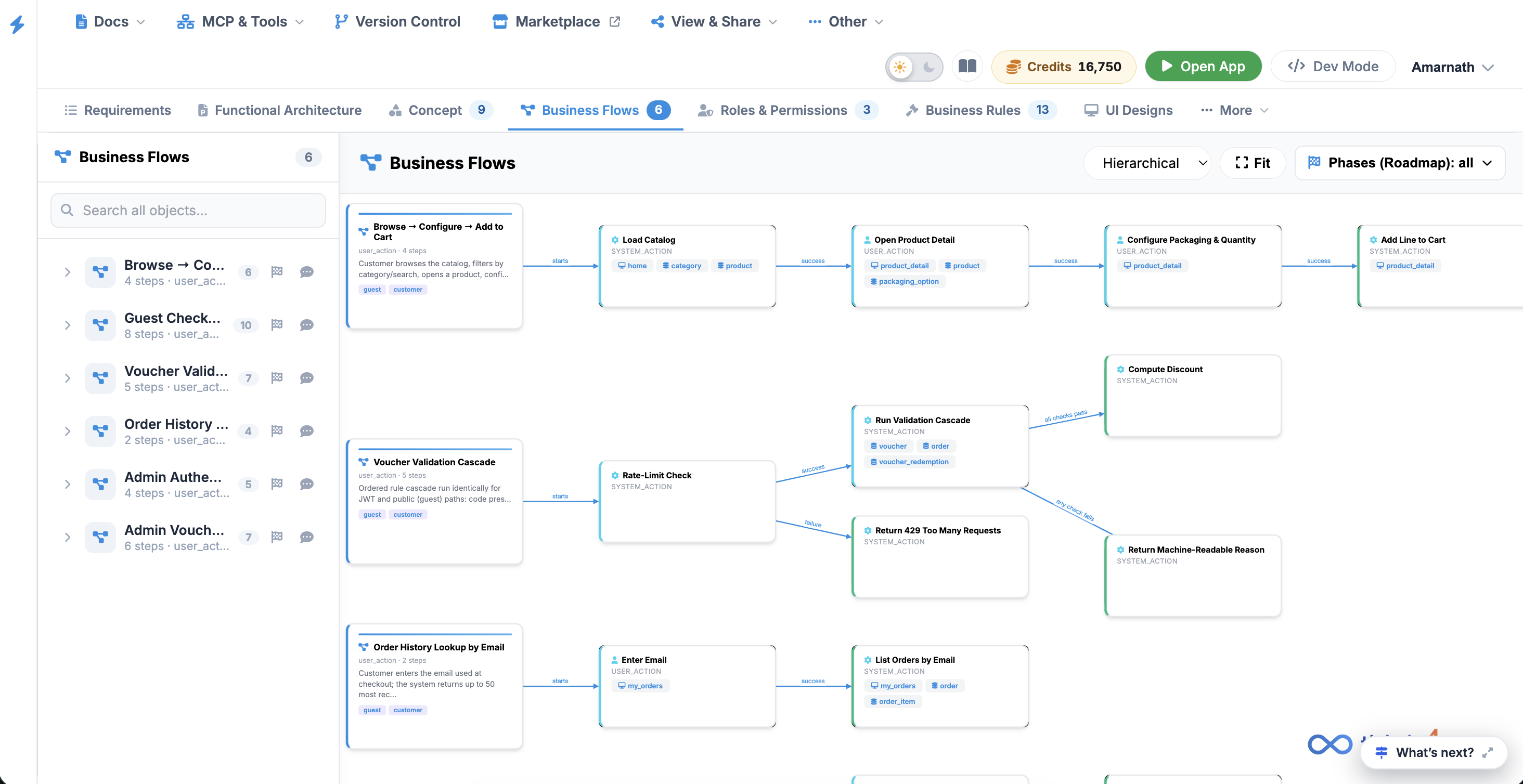
The Business Flows tab provides an interactive sequence editor and flowchart canvas that maps step-by-step user interactions, automated system actions, and state transitions across end-to-end business scenarios.
 Click to enlarge
Key UI Components#
- Business Flows Sidebar: Lists all 22 defined process flows (such as Customer Registration & Onboarding, Product Browse & Search, Order Fulfillment, and Dispute Resolution) with quick-search functionality.
- Flow Diagram Canvas: Visualizes sequential process chains using connected step cards:
- Flow Overview Cards: Summarizes overall workflow details, step count, target audience, and journey touchpoints.
- Step Cards: Represents individual actions tagged by action type (e.g., USER_ACTION, SYSTEM_ACTION), associated screen inputs, and integrated services (e.g., Twilio, Elasticsearch).
- Connector Lines: Displays directional decision logic and transition outcomes (e.g., success, failure) between steps.
- Canvas Toolbar: Top-right controls including layout view options (Hierarchical dropdown), Fit (re-center canvas), and a Phases (Roadmap) filter.