
State & Lifecycle
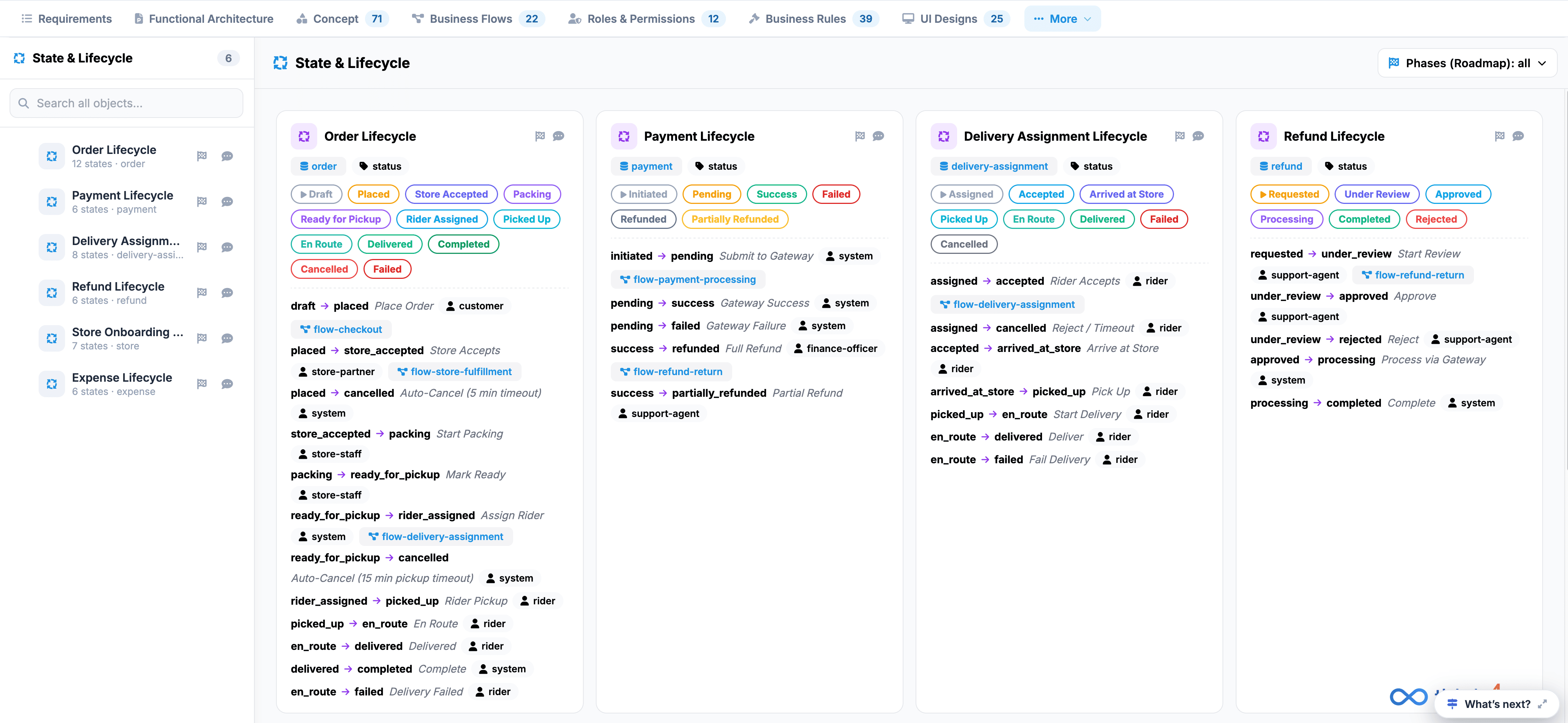
The State & Lifecycle tab defines state machine workflows, status transitions, permitted state changes, and triggering actors across primary entity lifecycles.
 Click to enlarge
Key UI Components#
- State & Lifecycle Sidebar: Lists all 6 defined state machines (such as Order Lifecycle, Payment Lifecycle, Delivery Assignment Lifecycle, Refund Lifecycle, Store Onboarding, and Expense Lifecycle) with quick-search functionality.
- Lifecycle Cards Grid: Interactive cards detailing individual state machine specifications:
- Status Pills: Color-coded badges mapping valid entity statuses (e.g., Draft, Placed, Pending, Success, Failed, Cancelled).
- State Transitions: Step-by-step rule listings detailing initial states, target states, transition actions, and assigned actors (e.g., draft → placed via Place Order by customer; placed → store_accepted by store-partner).
- Flow Mapping: Direct badges linking state triggers to relevant business flows (e.g., flow-checkout, flow-delivery-assignment).
- Canvas Toolbar: Top-right controls featuring a Phases (Roadmap) filter to sort state machines by implementation release.